Showing posts with label BizTalk. Show all posts

Monday, February 20, 2012

How to initialize correlation set multiple times?

There was a question in Microsoft BizTalk Server General Forum where the requirement was to promote values on the messages extracted from a batch of messages using orchestration.

How it could be implemented?

To promote the properties in orchestration one need to initialize the correlation set as demonstrated by Sarvana Kumar in his blog. But you can initialize the correlation set only once so here is the way to initialize correlation set multiple times.

I am just extending the code shared by Stephen W. Thomas for Envelope and XPath Debatching in an Orchestration Lab

Download the code from above link and follow these steps:
Step 1. Run the Visual Studio Conversion Wizard to convert the solution.
Step 2. Remove PortDebatching project from solution you don’t need it for this excercise.

 Step 3. Open the XPathSample.odx and create a correlation type and correlation set as shown below:
 

Step 4. Create a variable with name CompanyName and type string and initialize it as shown below:
CompanyName=xpath(SingleInput,"string(/*[local-name()='Data' and namespace-uri()='']/*[local-name()='Company' and namespace-uri()=''])");

Step 5. Drop a message assignment shape in the ConstrustMapped shape and use the following expression:
SingleMapped(BTS.DestinationParty)=CompanyName;

Step 6. Select the send shape SendSingleMessage and initialize the correlation set Correlation_Party


If you will try to build this BizTalk Project now you will get the compile time error: “'Correlation_Party': a correlation may be initialized only once”


How to get rid of error “'Correlation_Party': a correlation may be initialized only once”?

- Add a scope shape to the loop and set the Transaction Type for this scope to Automic/Long Running/None.

Note: The only requirement is to have scope shape with the correlation set defined on this scope level. You can set the transaction type to None or atomic or long running  for the scope depending on your requirement.

- Cut the correlation set Correlation_Party  from orchestration level and paste it to the level of this new scope.

- Move the send shape to this new scope.


Note: Check once again that the send port is initializing the correlation set 'Correletaion_Party'.

Build and deploy the solution and you will see Destination Party get promoted with the value of company name for each message generated in the loop.


Cheers,
Rohit Sharma

Wednesday, November 23, 2011

error BEC2004: Unrecognized data in remaining stream.


Charan: Hey Rohit I am getting a weird error while validating the instance of a simple flat file schema in visual studio.
Following the the simple flat file message here InfoHeader is tag identifier


and here is the schema created for this flat file


while validating the flat file using this schema I am getting the "error BEC2004: Unrecognized data in remaining stream." in Visual Studio output window as shown below:


Rohit: I got your problem you are getting this error because you have specified Header as Tag Identifier (tag_name in above screen shot) while it should be InfoHeader as per your flat file message so change it as shown below.


Charan: Ah it resolved the issue!!!

Cheers
Rohit Sharma

Friday, August 12, 2011

Error: "The published message could not be routed because no subscribers were found."


Charan: Hey Rohit I am getting the error "The published message could not be routed because no subscribers were found." as shown below. Do you have any idea how I can get rid of it?


Rohit: As this error is stating that  "the subscribing orchestration or send port has not been enlisted, or if some of the message properties necessary for subscription evaluation have not been promoted." Let  trouble shoot this error by using the BizTalk Administration console. 

First check the properties in the context of message and verify if you can see the desired properties promoted.

Charan: hmmm ok I am opening the routing failure reports:

 
I can see the property 'Customer' is promoted in the context of message.

 
Rohit: Then the second step would be to check the subscription. Let me check the Activation Subscription:


I can't see any subscription. Have you forgot to enlist the Send Port/Orchestration.

Charan: Let me check 
ohh... yes I forget to start the send port.

Rohit: Then start it and resume the message again.

Charan: I have started it and resuming the message.


Charan: hmmm... I am still getting the same error

Rohit: Let me check the Activation Subscription details.


I can see that you have specified the wrong name in send port subscription. It is showing as "ab" and based on the value of property Customer in the context of the message I think it should be "abc". Correct it in send port filter and resume the message.


Charan: Ah!! at last it worked !!!

Cheers
Rohit Sharma

Tuesday, August 9, 2011

The Cumulative update package 3 for BizTalk Server 2009 is now available

The Cumulative update package 3 for BizTalk Server 2009 is now available. The cumulative update package for Microsoft BizTalk Server 2009 contains hot fixes for issues that were fixed after the release of BizTalk Server 2009. You can download it from here: http://support.microsoft.com/kb/2557149.

Tuesday, August 2, 2011

Debatching XML message


Charan: hmmm I am in little trouble. I have ax XML message confirming to schema shown below and I want to debatch it so that the size of message can be reduced by splitting it into little chunks but don't know how to do it.


Rohit: You can debatch this message by splitting message based on ResponseRecord. To do this you need to perform 3 steps.

1. Convert the schema to envelope.
2. Create schema for single ResponseRecord
3.Create a receive port using XMLReceive pipeline.

Step1: Convert the schema to envelope by following these steps:
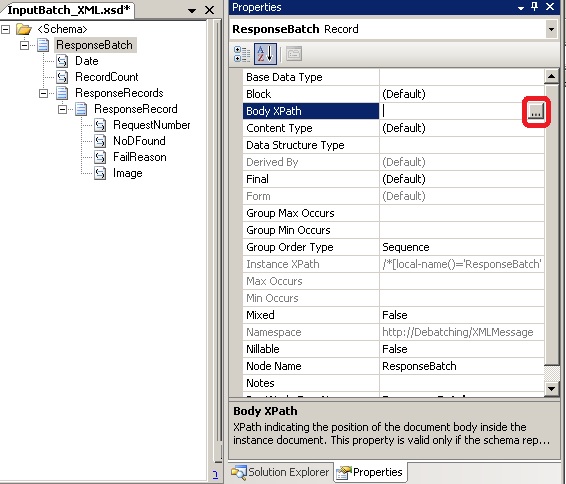
1.1 Set Envelope property to Yes by selecting the <Schema>
 

1.2 Set Body XPath to ResponseRecords as shown below.


Step2: Create schema for single ResponseRecord which would be parse the  debatched records by XMLReceive pipeline.
2.1 Import the batch schema into this schema.


2.2 Set the Data Structure Type of Root Node to ResponseRecord from the imported schema


2.3 Rename the Root node to ResponseRecord and make sure that Target Namespace is Empty


Deploy this solution.

Step3: Create a receive location using the XMLReceive pipeline and send port to test the solution.

Cheers
Rohit Sharma

Friday, July 22, 2011

Error: This application has failed to start because the application configuration is incorrect. Reinstalling the application may fix this problem

Charan: Hey Pal I am getting this weird error not sure what is wrong everything was working fine few hours ago and now I am unable to start the 32-bit BizTalk host instances. I have even repaired the BizTalk installation and still getting the same error.


Rohit: Have you done any recent changes to the machine.

Charan: Yes I have installed one BizTalk application exported from the other machine and this application get its connection string from the configuration file of BizTalk so I have modified the 'BTSNTSvc.exe.config'.

Rohit:  Let me see the 'BTSNTSvc.exe.config' file.
I got the issue you have not closed the tag as shown below.


 Charan: Oh what a silly mistake it fixed the issue. Now I can start the orchestration instance.

Cheers
Rohit Sharma

Tuesday, July 19, 2011

How to remove leading zeros from the value of element in a map

Charan: I have one additional requirement to my old problem mentioned here. Now I want to remove the leading  Zeros for the value of Element1 in addition to finding the existence of this optional element in input schema. Is there any easy way to do it.

Rohit: hmmm yes we can do it using the scripting functoid and simple C# code. Let me show you how.

Step1: Add new scripting functoid.

 
Step2: Configure Functoid Script use Inline C# as Script Type: and use the following simple C# code to remove the leading zeros in string:

public string RemoveLeadingZeros(string param1)
{
      string result=param1;
      if(param1.StartsWith("0"))
      {
          result=param1.TrimStart(new char[]{'0'});        
      }  
      return result;
}


Step3: Modify the existing scripting functoid to use this code to remove the leading zeros:

<Element xmlns:p="http://CheckNodeExistenceInMap.InputSchema_XML">
    <xsl:choose>
        <xsl:when test="/p:Record/Element1">
            <xsl:value-of select="userCSharp:RemoveLeadingZeros(string(/p:Record/Element1))" />
        </xsl:when>
        <xsl:otherwise>
            <xsl:value-of select="/p:Record/Element2" />
        </xsl:otherwise>
    </xsl:choose>
</Element>


Cheers
Rohit Sharma

Friday, July 15, 2011

Checking if the optional element exists or not in Mapping

Charan: I have a problem I have one schema which has one optional filed 'Element1' and I need to map this schema to other schema but the twist is if this optional filed is not present in the input schema then I need to map other filed 'Element2' to the output schema.
 Input schema with optional filed 'Element1'

 Output Schema

Rohit: You can do this using the Scripting functoid as shown below:
 Drag scripting functoid

 Configure scripting functoid

Following is the XSLT used for scripting functoid.
<Element xmlns:p="http://CheckNodeExistenceInMap.InputSchema_XML">
    <xsl:choose>
        <xsl:when test="/p:Record/Element1">
            <xsl:value-of select="/p:Record/Element1" />
        </xsl:when>
        <xsl:otherwise>
            <xsl:value-of select="/p:Record/Element2" />
        </xsl:otherwise>
    </xsl:choose>
</Element>

Note: If the value of property 'Element FormDefault' for the source schema is 'Qualified' then the alias for namespace need to be used for each element as mentioned below:

<Element xmlns:p="http://CheckNodeExistenceInMap.InputSchema_XML">
    <xsl:choose>
        <xsl:when test="/p:Record/p:Element1">
            <xsl:value-of select="/p:Record/p:Element1" />
        </xsl:when>
        <xsl:otherwise>
            <xsl:value-of select="/p:Record/p:Element2" />
        </xsl:otherwise>
    </xsl:choose>
</Element> 


Cheers
Rohit Sharma

Monday, July 4, 2011

Error: " The underlying connection was closed: An unexpected error occurred on a receive."

Moving the original post

Event Type:   Error
Event Source: BizTalk Server 2006
Event ID:       5754
Description:
A message sent to adapter "HTTP" on send port "<SendPortName>" with URI "<URL>" is suspended.
 Error details: The underlying connection was closed: An unexpected error occurred on a receive.

You can get the similar error for SOAP adapter too.

Cause
On production environment this error was occurring randomly once or twice in a month. After lot of investigation I came to know that the AppPool was getting recycled before Web Page can respond to the request.
Though there are no of reasons for AppPool recycle but in this case the IIS was hosted on a machine having sufficient resources(memory,CPU). I figured out that the app pool used for web application was configured to get recycled after 1740 minutes (which is default setting when you create new App Pool).

Resolution
Open the Internet Information Services (IIS) Manager go to Application Pool  and open the properties of the required application pool. Uncheck the "Recycle worker processes (in minutes):" check box.

Cheers
Rohit Sharma