Monday, April 22, 2013

Error: Schema referenced by Map has been deleted. The local, cached version of the BizTalk Server group configuration is out of date.

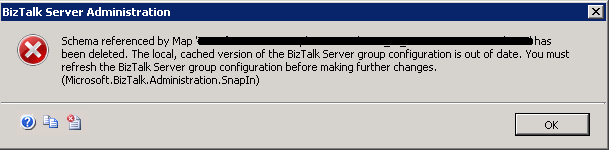
One of my colleges started getting following error on the development machine:

Schema referenced by Map '<Namespace>.<MappName>' has been deleted. The local, cached version of the BizTalk Server group configuration is out of date. You must refresh the BizTalk Server group configuration before making further changes. (Microsoft.BizTalk.Administration.SnapIn)


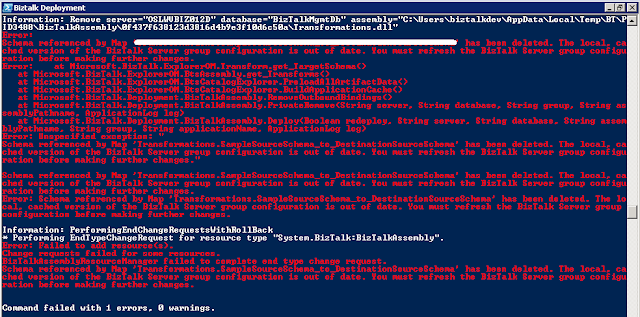
The deployment script stop working as deploying any DLL using BTSTask.exe was causing the same error:


I figured out that this issue has been fixed for BizTalk Server 2010 as part of KB2516201 and suggested to install the Cumulative Update 1 for BizTalk Server 2010. But it turned out that installing the KB article was not helping in this scenario.

Apart from the bugs fixed in Cumulative Update 1 this error can be caused by one more reason which was the case in this scenario.

You can re-produce this error by following these steps:

Step 1: Create a BizTalk project and add 2 sample schemas to it.
Step 2: Create another project add reference to the above BizTalk Project and add a mapper and use the 2 sample schemas created in Step 1 as source and destination in this map.
Step 3: Deploy the solution to BizTalk.
Step 4: Add another sample schema to the project created in Step 1.
Step 5: Update the mapper created in step 2 and replace either the source or destination schema with the new schema created in Step 4.
Step 6: Deploy only the DLL for the mapper project only.
Step 7: Try to refresh the BizTalk group in the BizTalk Administration Console or use the BTSTask you will start getting this error.

So be careful when using the deployment script and in script try to deploy the assemblies having schema first and if the deployment of any BizTalk assemblies having schema have been failed then script should not  proceed further.

As BTSTask was not able to add/remove any resource so the entry for this mapper from the BizTalk Management DB was removed manually by executing the following queries in SQL management studio:

Step 1: Open the SQL management Studio and connect to the instance having BizTalkMgmtDb. Run this query:

SELECT [id] FROM [BizTalkMgmtDb].[dbo].[bts_item]
WHERE FullName = '<CopyTheNameOfTheMapFromErrorMessage>'
GO

Step 2: Get the value of id and replace it in below query:

DELETE FROM [BizTalkMgmtDb].[dbo].[bt_MapSpec] WHERE itemid = <Value of id from above query>

It will delete the entry for map from the BizTalk Management Database now you can rectify the issue with your deployment script and can redeploy the solution.

Cheers
Rohit Sharma

Friday, April 19, 2013

Installing 64-bit Oracle Data Access Components (ODAC) for BizTalk 2010

I didn't find any good reference on this so though of documenting the steps that worked for me

Step 1: Go to 64-bit Oracle Data Access Components (ODAC) Downloads page and download 64-bit ODAC 11.2 Release 5 (11.2.0.3.20) Xcopy for Windows x64


Step 2: Unzip the file downloaded in Step 1 it to a folder location.


Step 3: Create a folder to install Oracle Client. I created C:\Oracle\ODAC_11_2_Release_5_64_Bit 

Step 4: Run the command prompt as Administrator and browse to location where the zip file was extracted in Step 2. 

Step 5: Install Oracle Instant Client and Oracle Data Provider for .NET 2 by executing the following command on Command prompt: 

install.bat odp.net2 C:\oracle\ODAC_11_2_Release_5_64_Bit OraClient11g_home1 true


Step 6: Install Oracle Data Provider for .NET 4 by executing the following command on Command prompt:

install.bat odp.net4 C:\oracle\ODAC_11_2_Release_5_64_Bit OraClient11g_home1 false

Note: Use the same name OraClient11g_home1 for Oracle home in all commands.


Step 7: Install Oracle Service for MTS by executing the following command on Command prompt:

install.bat oramts C:\oracle\ODAC_11_2_Release_5_64_Bit OraClient11g_home1 false


Step 8: Add the install directory (C:\oracle\ODAC_11_2_Release_5_64_Bit) and install directory's bin subdirectory (C:\oracle\ODAC_11_2_Release_5_64_Bit\bin) to the system environment variable PATH.

Step 9: Create the system environment variable ORACLE_HOME and set it’s value to C:\oracle\ODAC_11_2_Release_5_64_Bit

Step 10: Copy over/Create the tnsnames.ora to/at default location %ORACLE_HOME%/network/admin


Step 11: This step is optional if you need to change the language, territory or character set for the oracle client then in this case you need to change the value of registry key NLS_LANG available at path:

HKEY_LOCAL_MACHINE\SOFTWARE\Oracle\KEY_OraClient11g_home1

Note: If you have specified different name for oracle home instead of OraClient11g_home1 in above commands then you need to look for KEY_<OracleHome>

That's all you are done with installation. In my case I was using only 64-bit host for WCF-Oracle but if you want 32-bit host then you need to install 32-bit oracle client by follow the above steps but do create different folder.

Cheers
Rohit Sharma

Friday, March 1, 2013

There was a failure executing pipeline "BTAHL72XPipelines.BTAHL72XSendPipeline". Error details: "Body schema is missing".


If you want to know how to execute BTAHL72XSendPipeline in an orchestration or are facing error "Body schema is missing" while executing the BTAHL72XSendPipeline in orchestration then do download the code sample "How to execute BTAHL72XSendPipeline in an orchestration

Cheers
Rohit Sharma

Wednesday, February 6, 2013

Invoking a web service returning ISO-8859-1 encoded data with BizTalk Server 2010


The TextMessageEncodingBindingElement of WCF supports only the UTF-8, UTF-16 and Big Endean Unicode encodings. If the web service returns response in some other encoding e.g. ISO-8859-1 need to be consumed in BizTalk Server 2010 then the following error get logged in the event viewer:

System.ServiceModel.ProtocolException: The content type text/xml of the response message does not match the content type of the binding (application/soap+xml; charset=utf-8). If using a custom encoder, be sure that the IsContentTypeSupported method is implemented properly.

I have published the solution to above problem along with the code at MSDN.

Cheers
Rohit Sharma


Friday, August 31, 2012

Activation context generation failed for ...


One of my colleagues was getting the error.

Activation context generation failed for "…". Dependent Assembly Microsoft.VC80.CRT,processorArchitecture="amd64",publicKeyToken="1fc8b3b9a1e18e3b",type="win32",version="8.0.50727.6195" could not be found.

We thought installing Visual C++ 2005 Redistributable package on machine should resolve this problem so we installed the following packages on that machine:

But the problem still persisted after installing the above packages. Then we tried to generate the traces using the sxstrace.exe and found that reference was not getting resolved:
INFO: Parsing Manifest File “…”.
   INFO: Manifest Definition Identity is (null).
   INFO: Reference: Microsoft.VC80.CRT,processorArchitecture="amd64",publicKeyToken="1fc8b3b9a1e18e3b",type="win32",version="8.0.50727.6195"
INFO: Resolving reference Microsoft.VC80.CRT,processorArchitecture="amd64",publicKeyToken="1fc8b3b9a1e18e3b",type="win32",version="8.0.50727.6195".
   INFO: Resolving reference for ProcessorArchitecture amd64.
      INFO: Resolving reference for culture Neutral.
         INFO: Applying Binding Policy.
            INFO: Find publisher policy at C:\Windows\WinSxS\manifests\amd64_policy.8.0.microsoft.vc80.crt_1fc8b3b9a1e18e3b_8.0.50727.4927_none_09bd9a47facfb1f8.manifest
            INFO: No binding policy redirect found.
         INFO: Begin assembly probing.
            INFO: Did not find the assembly in WinSxS.
            INFO: Attempt to probe manifest at C:\Windows\assembly\GAC_64\Microsoft.VC80.CRT\8.0.50727.6195__1fc8b3b9a1e18e3b\Microsoft.VC80.CRT.DLL.
            INFO: Attempt to probe manifest at C:\PDFHotell\Microsoft.VC80.CRT.DLL.
            INFO: Attempt to probe manifest at C:\PDFHotell\Microsoft.VC80.CRT.MANIFEST.
            INFO: Attempt to probe manifest at C:\PDFHotell\Microsoft.VC80.CRT\Microsoft.VC80.CRT.DLL.
            INFO: Attempt to probe manifest at C:\PDFHotell\Microsoft.VC80.CRT\Microsoft.VC80.CRT.MANIFEST.
            INFO: Did not find manifest for culture Neutral.
            INFO: End assembly probing.
   ERROR: Cannot resolve reference Microsoft.VC80.CRT,processorArchitecture="amd64",publicKeyToken="1fc8b3b9a1e18e3b",type="win32",version="8.0.50727.6195".
ERROR: Activation Context generation failed.
End Activation Context Generation.
This issue gets resolved after the installation of KB2538242 which get installed as part of windows update.
Hope this would be helpful to others!!!
Cheers
Rohit Sharma

Friday, June 1, 2012

Book Review: BizTalk Server 2010 Cookbook by Steef-Jan Wiggers


I like the format of the book and Steef-Jan Wiggers has done a wonderful job of covering broad topics relevant to both the development of BizTalk solution and administration of BizTalk environment in 50+ easy to follow recipes. Enough details has been provided about the topic in each recipe but the good thing about this book is that each recipe also contain There’s more section having valuable resources to dive deeper into the topic discussed. Here is a brief overview of what has been covered in this book:

·         The book starts with the most important topic of setting up the BizTalk environment.  The newbie will like the recipe on how to use the BizTalk Benchmark Wizard to validate the Installation.

·         Second chapter the recipes covered some of the popular design patterns like splitter, aggregator, retry pattern etc.

·         Third chapter contain some useful recipes demonstrating how to instrument the BizTalk solution.

·         In fourth chapter the focus is on securing message exchange and contains some useful demonstration on how to use certificate in BizTalk for signing and encrypting/decrypting the messages.

·         Fifth chapter discuss recipes related to the WCF services and BizTalk

·         Sixth chapter starts with a recipe on installation of AppFabric Connect and then have some useful demonstration on how to connect BizTalk with cloud.

·         Seven chapter is specifically for BizTalk administration and contain some useful recipes on configuring the monitoring tools for BizTalk e.g. SCOM, BizTalk 360.

·         Eighth chapter contain recipes on how to use the Business Rule engine.

·         Last chapter focus on the unit testing of BizTalk Artifacts using the Visual Studio and Frameworks such as BizUnit, BizMock, and the BizTalk Map Test Framework

I found this book useful, this book is available on Packt and Amazon.

Monday, April 16, 2012

Mapping xs:any element to xs:base64Binary element


Source schema is containing <xs:any> element as shown below:


Destination schema is containing element with <xs:base64Binary> as data type as shown below:


To map the string value of <xs:any> element from source to Details element of type  <xs:base64Binary>  in destination. Drag a scripting functoid to map as shown below:


Use the following Inline C# code to convert string into Base64string:

public string GetBase64String(string stringData)
{
   byte[] encodedBytes = System.Text.ASCIIEncoding.ASCII.GetBytes(stringData);
   return System.Convert.ToBase64String(encodedBytes);
}

Drag another scripting functoid and set script type to Inline XSLT as shown below:

 
Use following Inline XSLT code:

<Details xmlns:p="http://MappingBase64Encoded.SourceSchema">
  <xsl:value-of select="userCSharp:GetBase64String(string(/p:Record/Details/*))" />      
</Details>
Note: Here Details element refer to the element in the destination schema and this XPath is to extract the value of child element of Details as there is only one element if there are more then position of child element need to be specified.
Connect the second scripting functoid (having Inline XSLT) to Details element in destination schema as show below:


Testing the map

Source Instance used:
<ns0:Record xmlns:ns0="http://MappingBase64Encoded.SourceSchema">
  <Source>SourceElement</Source>
  <Details>
    <Data01>This is demo content from source.</Data01>
  </Details>
</ns0:Record>
Map output:
<ns0:Record xmlns:ns0="http://MappingBase64Encoded.DstSchema">
  <Source>SourceElement</Source>
  <Details>VGhpcyBpcyBkZW1vIGNvbnRlbnQgZnJvbSBzb3VyY2Uu</Details>
</ns0:Record>

Cheers
Rohit Sharma