Showing posts with label Error. Show all posts

Monday, April 22, 2013

Error: Schema referenced by Map has been deleted. The local, cached version of the BizTalk Server group configuration is out of date.

One of my colleges started getting following error on the development machine:

Schema referenced by Map '<Namespace>.<MappName>' has been deleted. The local, cached version of the BizTalk Server group configuration is out of date. You must refresh the BizTalk Server group configuration before making further changes. (Microsoft.BizTalk.Administration.SnapIn)
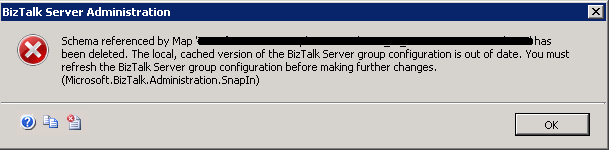


The deployment script stop working as deploying any DLL using BTSTask.exe was causing the same error:
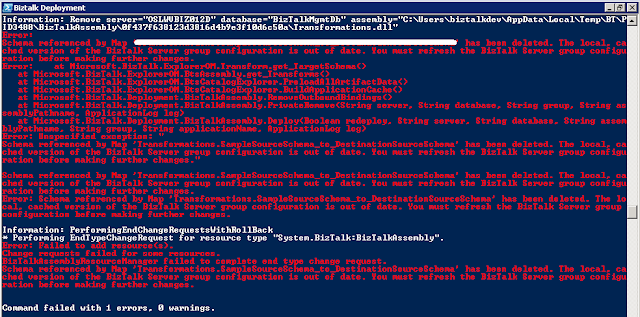


I figured out that this issue has been fixed for BizTalk Server 2010 as part of KB2516201 and suggested to install the Cumulative Update 1 for BizTalk Server 2010. But it turned out that installing the KB article was not helping in this scenario.

Apart from the bugs fixed in Cumulative Update 1 this error can be caused by one more reason which was the case in this scenario.

You can re-produce this error by following these steps:

Step 1: Create a BizTalk project and add 2 sample schemas to it.
Step 2: Create another project add reference to the above BizTalk Project and add a mapper and use the 2 sample schemas created in Step 1 as source and destination in this map.
Step 3: Deploy the solution to BizTalk.
Step 4: Add another sample schema to the project created in Step 1.
Step 5: Update the mapper created in step 2 and replace either the source or destination schema with the new schema created in Step 4.
Step 6: Deploy only the DLL for the mapper project only.
Step 7: Try to refresh the BizTalk group in the BizTalk Administration Console or use the BTSTask you will start getting this error.

So be careful when using the deployment script and in script try to deploy the assemblies having schema first and if the deployment of any BizTalk assemblies having schema have been failed then script should not  proceed further.

As BTSTask was not able to add/remove any resource so the entry for this mapper from the BizTalk Management DB was removed manually by executing the following queries in SQL management studio:

Step 1: Open the SQL management Studio and connect to the instance having BizTalkMgmtDb. Run this query:

SELECT [id] FROM [BizTalkMgmtDb].[dbo].[bts_item]
WHERE FullName = '<CopyTheNameOfTheMapFromErrorMessage>'
GO

Step 2: Get the value of id and replace it in below query:

DELETE FROM [BizTalkMgmtDb].[dbo].[bt_MapSpec] WHERE itemid = <Value of id from above query>

It will delete the entry for map from the BizTalk Management Database now you can rectify the issue with your deployment script and can redeploy the solution.

Cheers
Rohit Sharma

Wednesday, February 6, 2013

Invoking a web service returning ISO-8859-1 encoded data with BizTalk Server 2010


The TextMessageEncodingBindingElement of WCF supports only the UTF-8, UTF-16 and Big Endean Unicode encodings. If the web service returns response in some other encoding e.g. ISO-8859-1 need to be consumed in BizTalk Server 2010 then the following error get logged in the event viewer:

System.ServiceModel.ProtocolException: The content type text/xml of the response message does not match the content type of the binding (application/soap+xml; charset=utf-8). If using a custom encoder, be sure that the IsContentTypeSupported method is implemented properly.

I have published the solution to above problem along with the code at MSDN.

Cheers
Rohit Sharma


Wednesday, November 23, 2011

error BEC2004: Unrecognized data in remaining stream.


Charan: Hey Rohit I am getting a weird error while validating the instance of a simple flat file schema in visual studio.
Following the the simple flat file message here InfoHeader is tag identifier


and here is the schema created for this flat file


while validating the flat file using this schema I am getting the "error BEC2004: Unrecognized data in remaining stream." in Visual Studio output window as shown below:


Rohit: I got your problem you are getting this error because you have specified Header as Tag Identifier (tag_name in above screen shot) while it should be InfoHeader as per your flat file message so change it as shown below.


Charan: Ah it resolved the issue!!!

Cheers
Rohit Sharma

Friday, August 12, 2011

Error: "The published message could not be routed because no subscribers were found."


Charan: Hey Rohit I am getting the error "The published message could not be routed because no subscribers were found." as shown below. Do you have any idea how I can get rid of it?


Rohit: As this error is stating that  "the subscribing orchestration or send port has not been enlisted, or if some of the message properties necessary for subscription evaluation have not been promoted." Let  trouble shoot this error by using the BizTalk Administration console. 

First check the properties in the context of message and verify if you can see the desired properties promoted.

Charan: hmmm ok I am opening the routing failure reports:

 
I can see the property 'Customer' is promoted in the context of message.

 
Rohit: Then the second step would be to check the subscription. Let me check the Activation Subscription:


I can't see any subscription. Have you forgot to enlist the Send Port/Orchestration.

Charan: Let me check 
ohh... yes I forget to start the send port.

Rohit: Then start it and resume the message again.

Charan: I have started it and resuming the message.


Charan: hmmm... I am still getting the same error

Rohit: Let me check the Activation Subscription details.


I can see that you have specified the wrong name in send port subscription. It is showing as "ab" and based on the value of property Customer in the context of the message I think it should be "abc". Correct it in send port filter and resume the message.


Charan: Ah!! at last it worked !!!

Cheers
Rohit Sharma

Friday, July 22, 2011

Error: This application has failed to start because the application configuration is incorrect. Reinstalling the application may fix this problem

Charan: Hey Pal I am getting this weird error not sure what is wrong everything was working fine few hours ago and now I am unable to start the 32-bit BizTalk host instances. I have even repaired the BizTalk installation and still getting the same error.


Rohit: Have you done any recent changes to the machine.

Charan: Yes I have installed one BizTalk application exported from the other machine and this application get its connection string from the configuration file of BizTalk so I have modified the 'BTSNTSvc.exe.config'.

Rohit:  Let me see the 'BTSNTSvc.exe.config' file.
I got the issue you have not closed the tag as shown below.


 Charan: Oh what a silly mistake it fixed the issue. Now I can start the orchestration instance.

Cheers
Rohit Sharma

Monday, July 4, 2011

Error: " The underlying connection was closed: An unexpected error occurred on a receive."

Moving the original post

Event Type:   Error
Event Source: BizTalk Server 2006
Event ID:       5754
Description:
A message sent to adapter "HTTP" on send port "<SendPortName>" with URI "<URL>" is suspended.
 Error details: The underlying connection was closed: An unexpected error occurred on a receive.

You can get the similar error for SOAP adapter too.

Cause
On production environment this error was occurring randomly once or twice in a month. After lot of investigation I came to know that the AppPool was getting recycled before Web Page can respond to the request.
Though there are no of reasons for AppPool recycle but in this case the IIS was hosted on a machine having sufficient resources(memory,CPU). I figured out that the app pool used for web application was configured to get recycled after 1740 minutes (which is default setting when you create new App Pool).

Resolution
Open the Internet Information Services (IIS) Manager go to Application Pool  and open the properties of the required application pool. Uncheck the "Recycle worker processes (in minutes):" check box.

Cheers
Rohit Sharma

Error: "The HTTP send adapter cannot complete the transmission within the specified time"

Moving the original post

Event Type:   Error
Event ID:       5754
Description:
A message sent to adapter "HTTP" on send port "<SendPortName>" with URI "<URL>" is suspended.
Error details: The HTTP send adapter cannot complete the transmission within the specified time.

Cause
This error occurred for Solicit-response send port when the HTTP adapter does not receive the response within the time specified for Request timeout. The default value for Request timeout is 0 and in this condition the BizTalk Messaging Engine calculates the time-out based on the request message size.

Resolution
Set the value of Request timeout for send handler created for HTTP adapter then this change will affect all the send ports. or
You also have the option to set the value of Request timeout for a particular send port in HTTP Transport Properties.

Cheers
Rohit Sharma