Monday, January 2, 2012

BizTalk Server MVP 2012


First of all thanks to God, I can't expect any better start for this year. On this new year I got a great news of being Microsoft’s Most Valuable professional (MVP). I thank my peers, community members, fellow MVPs and Microsoft which honored me and recognized my contributions in BizTalk communities.

I'll continue to serve the BizTalk community more effectively with the best of my knowledge and experience.

Thanks
Rohit Sharma

Wednesday, November 23, 2011

error BEC2004: Unrecognized data in remaining stream.


Charan: Hey Rohit I am getting a weird error while validating the instance of a simple flat file schema in visual studio.
Following the the simple flat file message here InfoHeader is tag identifier


and here is the schema created for this flat file


while validating the flat file using this schema I am getting the "error BEC2004: Unrecognized data in remaining stream." in Visual Studio output window as shown below:


Rohit: I got your problem you are getting this error because you have specified Header as Tag Identifier (tag_name in above screen shot) while it should be InfoHeader as per your flat file message so change it as shown below.


Charan: Ah it resolved the issue!!!

Cheers
Rohit Sharma

Friday, September 2, 2011

Microsoft releases the Cumulative Update Package 2 for BizTalk Server 2010 and BizTalk Adapter Pack 2010

You can download  these updates from these links:

"This cumulative update package for Microsoft BizTalk Server 2010 contains hotfixes for the BizTalk Server 2010 issues that were resolved after the release of BizTalk Server 2010"


Prerequisites

To apply this cumulative update package, you must have BizTalk Server 2010 installed.
Note The following components are updated if they are installed:
  • Microsoft UDDI Services 3.0 that is included on the BizTalk Server 2010 installation disk
  • Microsoft BizTalk Adapters for Enterprise Applications (also known as BizTalk LOB Adapters)
"This cumulative update for BizTalk Adapter Pack 2010 contains hotfixes for BizTalk Adapter Pack 2010 issues that were fixed after the release of BizTalk Adapter Pack 2010."

Prerequisites

To apply this cumulative update package, you must have BizTalk Adapter Pack 2010 or Microsoft Windows Communication Foundation (WCF) Line-of-Business (LOB) Adapter SDK 2010 installed.

Friday, August 12, 2011

Error: "The published message could not be routed because no subscribers were found."


Charan: Hey Rohit I am getting the error "The published message could not be routed because no subscribers were found." as shown below. Do you have any idea how I can get rid of it?


Rohit: As this error is stating that  "the subscribing orchestration or send port has not been enlisted, or if some of the message properties necessary for subscription evaluation have not been promoted." Let  trouble shoot this error by using the BizTalk Administration console. 

First check the properties in the context of message and verify if you can see the desired properties promoted.

Charan: hmmm ok I am opening the routing failure reports:

 
I can see the property 'Customer' is promoted in the context of message.

 
Rohit: Then the second step would be to check the subscription. Let me check the Activation Subscription:


I can't see any subscription. Have you forgot to enlist the Send Port/Orchestration.

Charan: Let me check 
ohh... yes I forget to start the send port.

Rohit: Then start it and resume the message again.

Charan: I have started it and resuming the message.


Charan: hmmm... I am still getting the same error

Rohit: Let me check the Activation Subscription details.


I can see that you have specified the wrong name in send port subscription. It is showing as "ab" and based on the value of property Customer in the context of the message I think it should be "abc". Correct it in send port filter and resume the message.


Charan: Ah!! at last it worked !!!

Cheers
Rohit Sharma

Tuesday, August 9, 2011

The Cumulative update package 3 for BizTalk Server 2009 is now available

The Cumulative update package 3 for BizTalk Server 2009 is now available. The cumulative update package for Microsoft BizTalk Server 2009 contains hot fixes for issues that were fixed after the release of BizTalk Server 2009. You can download it from here: http://support.microsoft.com/kb/2557149.

Tuesday, August 2, 2011

Debatching XML message


Charan: hmmm I am in little trouble. I have ax XML message confirming to schema shown below and I want to debatch it so that the size of message can be reduced by splitting it into little chunks but don't know how to do it.


Rohit: You can debatch this message by splitting message based on ResponseRecord. To do this you need to perform 3 steps.

1. Convert the schema to envelope.
2. Create schema for single ResponseRecord
3.Create a receive port using XMLReceive pipeline.

Step1: Convert the schema to envelope by following these steps:
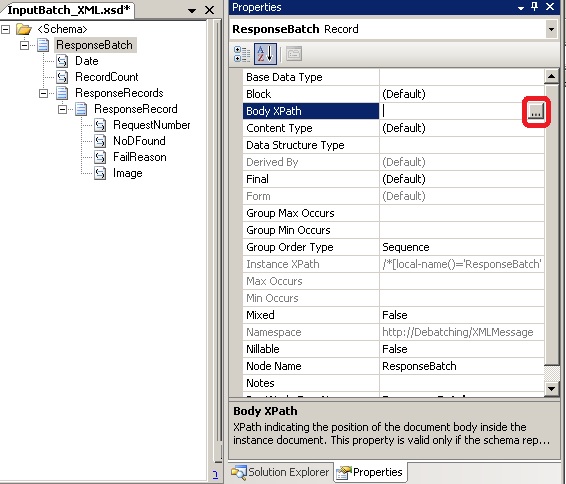
1.1 Set Envelope property to Yes by selecting the <Schema>
 

1.2 Set Body XPath to ResponseRecords as shown below.


Step2: Create schema for single ResponseRecord which would be parse the  debatched records by XMLReceive pipeline.
2.1 Import the batch schema into this schema.


2.2 Set the Data Structure Type of Root Node to ResponseRecord from the imported schema


2.3 Rename the Root node to ResponseRecord and make sure that Target Namespace is Empty


Deploy this solution.

Step3: Create a receive location using the XMLReceive pipeline and send port to test the solution.

Cheers
Rohit Sharma